
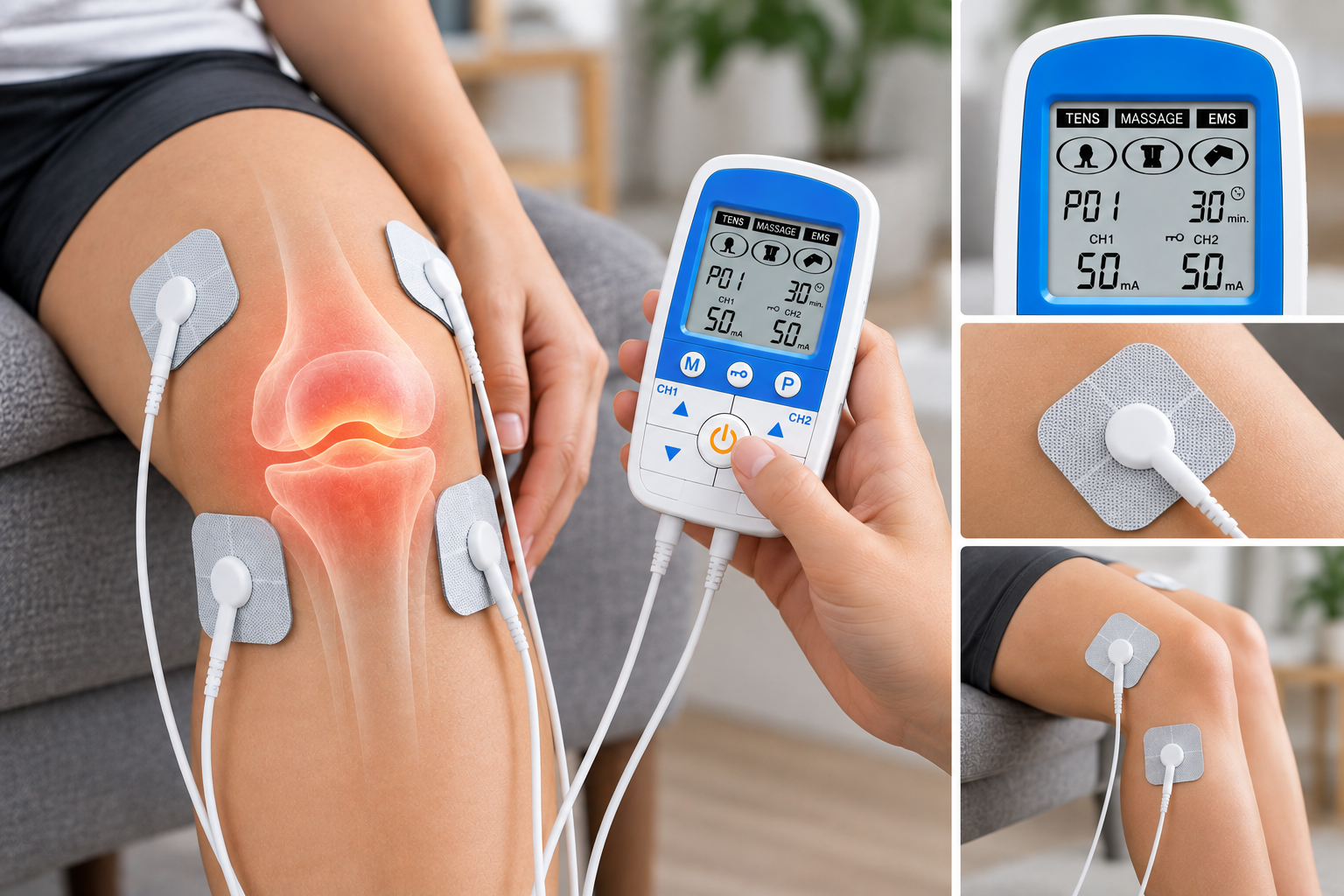
Best TENS Settings for Knee Pain: Frequency, Pulse Width and Intensity Guide
Finding the right TENS settings for knee pain is less about choosing one “perfect” number and more about finding a comfortable combination of frequency, pulse width, mode and intensity that works with your particular TENS machine and electrode placement.
As a general starting point, many conventional TENS programmes use a moderate-to-high pulse frequency and a comfortable sensory intensity. For example, Leeds Teaching Hospitals gives 70 Hz, 150 microseconds and continuous mode as an example starting setup, while noting that users may find different settings more helpful. Other NHS guidance uses different frequency and pulse-width combinations, demonstrating that there is no single setting that is correct for everyone.
The most important rule is simple: TENS should feel strong and noticeable but comfortable, not painful. Start at a low intensity and gradually increase it until you feel a clear tingling or buzzing sensation.
It is also important to understand what TENS can and cannot do. TENS may provide temporary pain relief for some people, but it does not work for everyone. If your knee pain has not been assessed, is persistent or is getting worse, TENS should not be used as a substitute for appropriate medical assessment.
Quick Answer: What Are the Best TENS Settings for Knee Pain?
There is no universally best setting for knee pain. A practical conventional TENS starting point may involve a frequency around 70 Hz, a pulse width around 100–150 microseconds, continuous mode where available, and an intensity that produces strong but comfortable tingling.
However, these numbers are examples rather than a prescription. NHS guidance varies between services, and the best setting depends on your device, electrode placement, sensitivity and response. Leeds Teaching Hospitals, for example, uses 70 Hz and 150 microseconds as an example but says settings can be changed if other settings are more helpful.
If you are new to TENS, start with the machine switched off, apply the electrode pads to clean, dry skin around the painful area, then gradually increase the intensity after switching the machine on. The sensation should be noticeable without becoming painful or unpleasant.
Understanding TENS Settings for Knee Pain
A TENS machine may have several controls. The exact options vary between models, but four settings are particularly important when using a TENS machine for knee pain: frequency, pulse width, intensity and mode.
Understanding what each one does makes it much easier to adjust your machine sensibly.
Frequency: How Fast the Electrical Pulses Arrive
Frequency, sometimes called pulse rate, is measured in Hertz (Hz). It tells you how many electrical pulses are delivered each second.
A higher frequency generally produces a faster, more continuous tingling sensation. A lower frequency produces a slower, more distinct pulsing sensation.
Different clinical TENS guides use different frequency ranges. One NHS pain service gives an example of starting around 70 Hz and notes that people may find changing the “speed” more comfortable. Another NHS hospital guide gives a conventional range of 60–150 Hz.
This variation is why you should not assume that the highest frequency is automatically the most effective for knee pain.
For someone using conventional TENS, around 70 Hz can be a reasonable example starting point if their machine allows it, but the setting should be adjusted according to comfort and the manufacturer’s instructions.
Pulse Width: How Long Each Pulse Lasts
Pulse width refers to the duration of each individual electrical pulse. It is usually measured in microseconds (µs).
Changing the pulse width can alter how the stimulation feels. A setting that feels comfortable at one pulse width may feel noticeably different after the pulse width is changed.
Clinical guidance uses different pulse widths. Leeds Teaching Hospitals gives 150 µs as an example, while other NHS guidance describes conventional TENS settings around 70–100 µs or broader ranges.
For that reason, there is no single “best pulse width” for knee pain.
If your machine allows you to change pulse width, make one adjustment at a time and reassess the sensation. If the stimulation becomes uncomfortable, reduce the intensity or return to a previous setting.
Intensity: How Strong the TENS Feels
Intensity controls the strength of the electrical stimulation.
This is different from frequency. Frequency changes how quickly the pulses are delivered, whereas intensity changes how strong the stimulation feels.
When using TENS for knee pain, begin at a low intensity and gradually turn it up. NHS guidance recommends increasing the current until you feel a tingling sensation and states that it should not be painful. RNOH similarly advises starting low and gradually increasing the intensity until it feels strong but comfortable.
Think of the target sensation as:
Strong + noticeable + comfortable
Not:
Maximum + painful + unbearable
You do not need to use the highest intensity available on your machine.
Mode: Continuous, Burst or Modulation
Depending on the machine, you may see modes such as:
- Continuous or normal
- Burst
- Modulation
- Programmed or preset modes
Continuous mode provides a relatively consistent stimulation pattern. Burst mode delivers groups of pulses, while modulation changes aspects of the stimulation pattern.
Leeds Teaching Hospitals gives continuous mode as an example starting setting and explains that users can change settings if they find another combination more helpful.
If your TENS machine has several programmes, start with the manufacturer’s recommended programme rather than assuming that the most advanced or strongest setting is best.
A Useful Starting Guide to TENS Settings for Knee Pain
The following table is designed to help you understand the controls, rather than prescribe a fixed treatment.
| TENS setting | Example starting point | What it changes | What to aim for |
| Frequency | Around 70 Hz | Speed of electrical pulses | Comfortable, consistent tingling |
| Pulse width | Around 100–150 µs | Duration of each pulse | Comfortable stimulation |
| Mode | Continuous/normal | Pattern of stimulation | A steady, manageable sensation |
| Intensity | Start low and increase gradually | Strength of stimulation | Strong but comfortable tingling |
| Duration | Start around 30–60 minutes | Length of session | Comfortable use without skin irritation |
These example values should not be treated as universal medical instructions. NHS sources use different settings depending on the TENS device and clinical situation. Cambridge University Hospitals, for example, recommends beginning with 30–60 minutes and increasing use if helpful, whereas other NHS services provide different approaches to duration.
How to Find Your Most Comfortable TENS Setting
Instead of repeatedly changing every control, adjust your TENS settings for knee pain systematically.
Step 1: Check your machine
Read the manufacturer’s instructions and make sure you understand what each control does.
If your machine has preset programmes, check what the programme is designed to do before changing individual settings.
Step 2: Prepare your skin
Switch the machine off before applying the electrode pads.
Your skin should be clean, dry and intact. Avoid applying creams, lotions or talc underneath the electrodes because this can interfere with adhesion and electrical contact.
Step 3: Position the electrode pads
For knee pain, electrodes are generally positioned around the painful area rather than allowing the pads to touch one another. NHS guidance gives an example of electrodes positioned above and below the knee.
For detailed guidance, see our article on Best TENS Pad Placement for Knee Pain.
Step 4: Start with a low intensity
Turn the TENS machine on only after the pads are correctly positioned.
Increase the intensity slowly.
Step 5: Find a strong but comfortable sensation
You should normally feel tingling, buzzing or pulsing.
If it becomes painful, sharply uncomfortable or unpleasant, reduce the intensity.
RNOH specifically advises gradually increasing the intensity until it is strong but comfortable and reducing it if the sensation becomes painful or uncomfortable.
Step 6: Change one setting at a time
If you want to experiment with frequency or pulse width, change one control rather than changing everything simultaneously.
This makes it easier to work out which setting produces the most comfortable sensation.
What Frequency Should I Use for Knee Pain TENS?
There is no universally correct TENS frequency for knee pain.
A frequency of around 70 Hz is used as an example in Leeds Teaching Hospitals’ patient guidance, while other NHS guidance gives broader ranges such as 20–130 Hz or 60–150 Hz.
This means a setting around 70 Hz can be considered a practical example when your device supports it, rather than a medically prescribed target.
If the sensation is comfortable and the TENS appears useful, there may be no reason to keep changing the frequency.
If the sensation becomes uncomfortable or you feel you are becoming accustomed to it, your device may allow you to adjust the frequency or use another programme. Make changes gradually.
What Pulse Width Should I Use for Knee Pain?
Pulse width is usually expressed in microseconds.
An example of 150 µs is used in Leeds Teaching Hospitals’ TENS instructions, while other NHS guidance uses lower pulse widths or broader ranges.
This variation reinforces an important point: 150 µs is an example, not a universal prescription for knee pain.
If your TENS machine has an adjustable pulse-width control, follow the manufacturer’s recommended range. If a physiotherapist or pain specialist has prescribed specific settings, use those instructions instead.
How Strong Should TENS Feel on the Knee?
The ideal intensity is usually described in terms of sensation rather than a particular number on the machine.
Start low.
Gradually increase the intensity.
Stop increasing when the sensation becomes strong but comfortable.
You should feel the stimulation as tingling, buzzing or pulsing. It should not feel like painful shocks.
If the stimulation produces a strong or unwanted muscle contraction, reduce the intensity and reassess the pad position and settings.
Your skin should also remain comfortable. If it becomes itchy, irritated or red, switch the machine off and remove the pads. NHS guidance specifically advises stopping TENS if the skin becomes irritated.
Can You Increase TENS Intensity as You Get Used to It?
You may notice that a setting that felt strong at the beginning of a session feels less noticeable later.
Some clinical TENS guidance explains that the intensity may need to be increased slightly as you become accustomed to the sensation.
If this happens, increase the intensity gradually rather than making a large jump.
However, becoming accustomed to the sensation does not mean that you should continually increase the output to the highest possible level.
TENS Settings and Electrode Placement Work Together
Your settings cannot be considered separately from your electrode placement.
Moving the pads can change the area where you feel the stimulation and can alter how strong the sensation feels.
For knee pain, pads may be positioned above and below or on either side of the painful area, depending on the machine’s instructions and the placement demonstrated by a healthcare professional. NHS guidance recommends leaving a gap between electrodes.
If you move your electrode pads for knee pain, reassess the intensity rather than assuming the previous intensity will feel exactly the same.
Avoid placing electrodes over irritated, infected, broken or numb skin.
How Long Should You Use TENS for Knee Pain?
There is no single session length that applies to every person or every TENS machine.
Cambridge University Hospitals advises starting with 30–60 minutes and increasing the duration if TENS is helpful. Another NHS pain service describes different usage patterns, showing that duration can vary considerably according to the individual and device.
If you are new to TENS, starting with a shorter session gives you an opportunity to see how your knee and skin respond.
A practical checklist is:
- Start with approximately 30–60 minutes.
- Keep the intensity comfortable.
- Check your skin after removing the pads.
- Follow the manufacturer’s maximum recommended usage.
- Take breaks if your device instructions recommend them.
- Do not sleep while wearing TENS.
- Do not use TENS in the bath or shower.
- Do not use TENS while driving or operating machinery.
Why TENS May Feel Weak on the Knee
If your TENS machine knee pain setup feels weaker than expected, increasing the intensity immediately may not solve the problem.
Check the basics first.
Electrode condition: Old or worn pads may not make consistent contact with the skin.
Skin preparation: Oils, creams and lotions can affect electrode adhesion.
Lead connections: Make sure the leads are firmly connected to the machine and electrodes.
Pad position: Small changes in placement can alter the sensation.
Intensity: The intensity may need gradual adjustment as you become accustomed to the stimulation.
Programme: Changing frequency, pulse width or mode can change the sensation.
If you regularly experience weak or inconsistent stimulation, our guide on why a TENS machine can feel weak and what to check provides additional troubleshooting information.
Should TENS Settings Cause Muscle Contractions?
Not necessarily.
Pain-relief TENS is generally used to produce a sensory tingling or buzzing sensation. If you experience strong or uncomfortable muscle contractions, reduce the intensity.
This is particularly relevant when using a combination TENS and EMS device. Although both use electrical stimulation, TENS and EMS are not the same type of programme and should not be used interchangeably.
If your machine has separate TENS and EMS modes, check the manufacturer’s instructions before selecting an EMS programme for knee use.
Does TENS Help Knee Pain?
TENS can provide temporary pain relief for some people, but it does not work for everyone. The NHS describes TENS as a treatment that may help certain short- and long-term pain, including pain associated with arthritis, while also making clear that it is not effective for everyone.
There is an important distinction for people with knee osteoarthritis.
NICE’s evidence review found uncertainty around electrotherapy treatments for osteoarthritis, and NICE’s osteoarthritis guideline does not recommend TENS as a routine treatment. This means people with osteoarthritis should not rely on TENS as their main treatment or assume that changing the settings will overcome the limitations of the evidence.
For ongoing knee pain, particularly if you have not been diagnosed, appropriate assessment remains important.
Where Should TENS Pads Go for Knee Pain?
TENS pads are generally placed on or around the painful area, depending on the location of the symptoms and the instructions for your particular machine.
NHS guidance gives an example of pads positioned above and below the knee, while other NHS guidance recommends placing electrodes either side of the painful area and keeping them separated.
The pads should be applied to clean, dry, intact skin.
If you are unsure where to position them, ask a physiotherapist or other healthcare professional to demonstrate appropriate placement.
For a more detailed knee-specific guide, see Best TENS Pad Placement for Knee Pain.
How Long Can TENS Be Used for Knee Pain?
The appropriate duration depends on your device, your individual response and any instructions provided by your healthcare professional.
A reasonable first trial is often around 30–60 minutes, particularly if you are new to TENS. Cambridge University Hospitals recommends beginning with this duration and increasing use if it proves helpful.
Do not assume that longer use automatically means greater pain relief. Pay attention to comfort and your skin condition, and follow your manufacturer’s instructions.
Common Mistakes When Choosing TENS Settings for Knee Pain
Choosing the highest intensity
Maximum intensity is not the goal. Strong but comfortable stimulation is more appropriate than painful stimulation.
Copying somebody else’s exact settings
A setting that feels comfortable for one person may feel very different for another.
Changing every setting at once
If you change frequency, pulse width, mode and intensity simultaneously, you cannot easily tell which adjustment made the difference.
Ignoring electrode placement
Incorrect or inconsistent pad placement can change the sensation considerably.
Using damaged electrodes
Worn electrode pads can affect skin contact and stimulation.
Continuing despite skin irritation
If your skin becomes itchy, irritated or red, switch the machine off and remove the electrodes.
Assuming TENS treats the cause of knee pain
TENS is primarily used for temporary pain relief. It does not diagnose the cause of knee pain or necessarily treat the underlying condition.
Using TENS without checking whether it is suitable
The NHS advises against TENS for people with epilepsy or a pacemaker and advises pregnant people to use it only if their doctor or midwife recommends it.
A Simple TENS Settings Checklist for Knee Pain
Before starting a session, run through this checklist:
- Machine: Check the device and leads are working correctly.
- Skin: Make sure the skin is clean, dry and intact.
- Pads: Check that electrodes are in good condition and sticking properly.
- Placement: Position the pads around the painful knee area according to your instructions.
- Machine off: Apply or remove pads only while the machine is switched off.
- Frequency: Start with an appropriate conventional setting, such as around 70 Hz if supported by your device.
- Pulse width: Use your machine’s recommended range; around 100–150 µs is an example used in some NHS guidance.
- Intensity: Start low and increase gradually.
- Sensation: Aim for strong, comfortable tingling.
- Pain: Never deliberately turn the intensity up until it hurts.
- Skin: Check for irritation after use.
- Safety: Do not use TENS while sleeping, bathing, showering, driving or operating machinery.
When to Speak to a Healthcare Professional
TENS may be useful as a temporary pain-management tool for some people, but persistent knee pain should not simply be managed indefinitely with a TENS machine.
Seek medical advice if your knee pain is persistent, worsening, significantly limits your normal activities or you are unsure what is causing it.
You should also seek appropriate medical assessment if the knee is very painful, you cannot move it or put weight on it, it is badly swollen or its shape has changed.
If you already have a diagnosis and have been advised to use TENS, a physiotherapist or other healthcare professional can also help you decide where to place the electrodes and how to adjust your machine.
Choosing a TENS Machine for Knee Pain
If you are comparing TENS machines, adjustable controls can be useful because they allow you to modify the sensation rather than being restricted to one fixed programme.
Useful features may include:
Adjustable intensity: Allows you to gradually increase stimulation and find a comfortable level.
Multiple programmes: Gives you different stimulation patterns to try.
Adjustable frequency and pulse width: Useful if you want greater control over the sensation.
Clear controls: Straightforward controls make it easier to adjust settings safely.
Reliable electrode connections: Consistent contact helps produce predictable stimulation.
If you are comparing devices before buying, our guide to the best TENS machine features to look for explains the features worth considering.
TENS Machines
TensLeads offers a range of TENS Machines designed for people looking for adjustable electrical stimulation and portable pain-management options. When choosing a machine, consider the controls, programmes, intensity range, electrode compatibility and instructions supplied with the device.
Replacement Electrode Pads
Good-quality Replacement Electrode Pads are an important part of a TENS setup. Pads that are clean, intact and properly adhered to the skin can provide more consistent contact than worn electrodes.
TensLeads offers replacement electrode pads in different sizes and connection types, helping you choose electrodes compatible with your particular TENS system.
Explore TENS Machines; Replacement Electrode Pads
Ready to compare your options? Explore TENS Machines; Replacement Electrode Pads at TensLeads and find the equipment that fits your TENS setup.
Key Takeaways
There is no single best TENS setting for knee pain. The ideal combination varies between individuals, machines and electrode placement.
Around 70 Hz can be a practical example starting frequency. Leeds Teaching Hospitals uses 70 Hz in an example continuous TENS setup, but also states that users may find different settings more helpful.
Pulse width is not one-size-fits-all. Examples in NHS guidance include around 70–100 µs and 150 µs, demonstrating why you should follow your machine’s instructions rather than relying on one number.
Intensity should be strong but comfortable. Start low and increase gradually until you feel a clear tingling or buzzing sensation. It should not be painful.
Change one setting at a time. This makes it easier to find a comfortable combination.
Electrode placement matters. Pads should be positioned around the painful area as instructed, with clean, dry skin and space between electrodes.
Start with a shorter session if you are new to TENS. Around 30–60 minutes is a practical starting point, with duration adjusted according to comfort, usefulness and your device instructions.
TENS provides temporary pain relief rather than a cure. It should not replace assessment or appropriate treatment for persistent knee pain.
NICE does not recommend TENS as a routine treatment for osteoarthritis. If your knee pain is related to osteoarthritis, discuss evidence-based treatment options with a healthcare professional.
Safety Disclaimer
This article provides general information about TENS settings for knee pain and is not personalised medical advice or a diagnosis. TENS does not work for everyone and may not be suitable for people with certain conditions or medical devices. The NHS advises against TENS if you have epilepsy or a pacemaker and recommends that pregnant people use TENS only on advice from a doctor or midwife. Do not use TENS on irritated, broken, infected or numb skin, or while sleeping, bathing, showering, driving or operating machinery.
Always follow the instructions supplied with your TENS machine and speak to a GP, physiotherapist or other qualified healthcare professional if you are unsure whether TENS is appropriate for your knee pain.